Orcheule

Orchestrate Scheduling with Perfect Harmony

Move beyond basic timetabling. Orchedule™ transforms complex institutional scheduling into harmonious orchestration. We empower academic departments with complete scheduling autonomy while ensuring seamless coordination, resource sharing, and conflict-free collaboration.

Unit-Level Autonomy
Intelligent Automation
Per-Student Timetables
About Orchedule™

Beyond Scheduling: Academic Orchestration

What is Orchedule?

Orchedule™ is a multi-user platform designed to orchestrate scheduling across multiple stakeholders within an academic institution. It contextualizes scheduling within the broader ecosystem of interconnected departments, academic programs, and registration units.

Unlike traditional tools that manage isolated components, Orchedule conducts the entire academic symphony—harmonizing colleges, departments, cross-unit collaborations, and curricula into one intelligent platform.



Orchedule Logo
Relationship-Aware

Considers complex interdependencies between all academic elements to prevent domino-effect scheduling conflicts.

Multi-Dimensional

Orchestrates across time, space, hierarchy, and organizational boundaries.

Institutional Architecture

Built upon the hierarchical structures of educational institutions, natively supporting colleges, programs, and registration units.

Strategic Coordination

Elevates traditional scheduling—the allocation of time and resources—by embedding it within a fully structured, strategic ecosystem.

The Difference

How our platform outpaces traditional scheduling methodologies

Traditional Centralized
  • Rigid top-down control
  • Limited unit input
  • Slow to adapt
  • One-size-fits-all model
Chaotic Decentralized
  • Resource conflicts
  • Poor coordination
  • Misaligned policies
  • Communication barriers
Optimal
Orchedule™
  • True departmental autonomy
  • Seamless integration
  • Conflict-free sharing
  • Intelligent automation
Impact & Transformation

The Transformation

A side-by-side look at how our platform redefines academic operational efficiency.

Before
  • Manual scheduling prone to conflicts and human error
  • Isolated academic operations with poor coordination
  • Inefficient utilization of rooms and resources
  • Time-consuming administrative processes
  • Frequent scheduling changes resulting in disruptions
After
  • Automated conflict-free scheduling with real-time validation
  • Seamless cross-unit collaboration and synchronization
  • Optimal resource utilization via smart constraints
  • Streamlined processes drastically reducing admin time
  • Stable, highly-reusable schedules with zero disruptions
Academic Unit Empowerment

Academic Unit Autonomy with Flexible Operations

Orchedule empowers academic units (i.e., departments, programs, tracks) with complete scheduling autonomy while supporting flexible operational approaches - from centralized coordination to distributed responsibility sharing, all within the same unified platform.

Academic Unit-First Hierarchical Design

Orchedule is architected with academic units at its core, operating within a sophisticated hierarchical structure that provides clear authority delegation while maintaining complete academic unit autonomy over scheduling operations.

Role-Based Authority Matrix

Academic unit users have defined scopes with progressive permissions, ensuring clear responsibility boundaries

Complete Scheduling Lifecycle Control

From class creation to lesson scheduling - academic units manage the entire academic scheduling process independently

Study Plan-Driven Section Management

Academic units build and track schedules based on their study plans and expected students. Instructor assignment routes to teaching departments, while sections and their schedules remain under the originating academic unit's full control

Operational Approaches for Diverse Workflow Preferences

The same Orchedule platform naturally adapts to your institutional culture and workflow preferences, supporting different operational philosophies through how you choose to use the system.

Centralized Approach

Registration offices can coordinate all academic unit schedules from a unified perspective when institutional oversight is preferred

Distributed Approach

Academic units operate with full autonomy, creating their own schedules while maintaining seamless collaboration

Collaborative Approach

Mixed workflows where registration and academic units work together, each handling their areas of expertise

Comprehensive Departmental Authority

Departments control the complete scheduling lifecycle - from students groups creation and course selection to load assignment and lesson scheduling, with specialized roles for departmental users.

  • Class and section management
  • Faculty workload distribution
  • Resource and facilities requests
  • Student enrollment coordination
Flexible Workflows

The same platform supports different operational approaches based on institutional culture - centralized coordination, distributed responsibility, or collaborative workflows.

  • Adaptable to institutional culture
  • Multiple workflow patterns
  • Seamless operational transitions
Advanced Interdepartmental Coordination

Sophisticated interdepartmental load assignment system enables seamless collaboration for shared courses while maintaining departmental teaching autonomy and workload control.

  • Interdepartmental load management
  • Joint section creation and merging
  • Cross-departmental instructor assignment
  • Automatic conflict resolution

The Scheduling Framework

How Orchedule Works:
Two-Phase Automated Scheduling

Orchedule's framework is built on a robust foundation of granular control, allowing you to manually create, edit, and manage every Class, Section, and Workload natively via comprehensive data panels. On top of this proven manual system sits an optional, powerful two-phase automation pipeline designed for massive scale. First, advanced templates can automatically generate your entire scheduling data in bulk. Then, the engine schedules everything in terms of time and place. Experience the freedom of absolute manual precision, or automate thousands of entries seamlessly with a single click.

Phase 1

Data Generation

Retain full granular control to create and assign Classes, Sections, and instructor Workloads one by one manually, or leverage our optional template-based automation layer to generate thousands of records instantly in bulk.

  • Classes & Sections
  • Instructor Workloads
  • Pre-scheduling configuration
Seamless Hand-off
Phase 2

Time & Place

Auto-generate full timetables at any scope (class, department, institution). Seamlessly handles conflicts and constraint validations instantly.

  • Day & Time Slots
  • Facility Assignment
  • Conflict Resolution
Phase 1 — Scheduling Data 3 Steps
Phase 2 — Timetable 1 Step
1
Organize Student Groups

Define student groups (Classes) organized by academic level, program, campus, and category. This forms the academic population that will receive schedules.

Bulk-generate using Class Templates
2
Build Sections

For every student group, connect courses and assign instructors — creating Sections. Section creation and workload assignment are independent and asynchronous: either can happen first, in any order.

Distributed: multiple units work simultaneously
3
Define Relations & Constraints

Fine-tune the scheduling data — define joint sections, concurrent sections, non-conflicting groups, and time-off windows for any entity.

Smart constraints guide the scheduler automatically
4
Schedule in Time & Place

Place sections onto the timetable grid with day, time, and facility. Scope ranges from a single student group to the entire institution. Fully automatic, selective, or visual drag-and-drop — your choice.

One-click: class, department, or institution-wide
DC

Built for Distributed Work

Multiple units. Parallel work. Zero coordination overhead.

Orchedule is not built around a single operator doing everything in sequence. The platform is designed so that each academic unit works within its own scope, independently and simultaneously — from section creation to workload assignment to timetable generation.

The system reconciles all contributions automatically, across departments, colleges, and institutions — making Orcheduling a truly distributed, collaborative orchestration rather than a bottlenecked serial process.

B
Beneficiary Academic Unit
Host Program / Track
Define student groups (Classes)
Add course offerings
Create & assign sections to student groups
Consume workloads (auto-assign during creation/later)
Generate timetables
Orchedule
Seamless Reconciliation
Async & Bidirectional
T
Offering Department
Teaching Academic Unit
Define workload templates consumed by beneficiaries
Auto-assign workloads via pre-defined templates
Manually assign workloads precisely to sections
Pre-Scheduling Configuration

Relations & Constraints

Before placing any lesson on the timetable, Orchedule lets you define the logical relationships and boundaries that shape how the scheduler works. These constraints are embedded into Phase 1 so the scheduler in Phase 2 can operate with complete, accurate intelligence.

Joint Sections

A single section shared across multiple student groups (classes). All joint classes share the same lesson slot — the scheduler guarantees no class has a conflict with its own joint section.

Example
Physics lecture shared by three engineering tracks
Concurrent Sections

Two or more sections explicitly defined to be scheduled at the same time, with the same or different instructors. The timeslot linkage is enforced automatically.

Example
Two lab sections that must always run simultaneously
Non-Conflicting Groups

A named group of sections that must never overlap in time. Crucial when individual students belong to different primary classes but share common elective sections.

Example
Multiple course sections sharing access to one lab
Time-Off Windows

Define unavailability windows for any entity: student groups, instructors, courses, or facilities. The scheduler respects these boundaries automatically.

Example
An instructor is unavailable on Thursday afternoons
Individual Student Scheduling

Every Student Gets a Schedule

Traditional timetabling breaks down when students deviate from the standard study plan — irregular students, repeaters, transfer credits. Orchedule's Course Scheduling Request system solves this end-to-end: from capturing each student's course intent, through building their personal class grouping, to delivering a conflict-free, individualized timetable.

The Problem
Irregular students — those not following the standard plan — cannot be placed into any existing class group. Attempting to schedule them causes conflicts and manual workarounds that delay the entire timetable.
The Solution
Course Scheduling Requests capture each student's intent precisely. Ad-hoc Student Classes are formed around those requests and plugged into the existing scheduling data as joint sections — so every student, however irregular, gets a guaranteed conflict-free personal timetable.
Scales to Any Volume
Handles any number of irregular students without manual workarounds or bottlenecks.
Zero Data Duplication
Integrates directly into your existing scheduling data — no parallel systems, no re-entry, no disruption to current class groups.
Maximizes Enrollment
Every irregular student gets a course slot, maximizing enrollment rates and ensuring full course availability across the institution.
Conceptual Workflow — From Request to Timetable
1
Capture Intent & Build Class
Course Scheduling Request
A Course Request Template automatically creates a dedicated Student Class for the irregular student. The user then adds the specific courses the student needs to take, preparing them to be assigned to sections.
2
Plug into Sections
Assign as Joint Sections
For each course in the request, the Student Class is added to the appropriate section as a Joint Class. The section already serves a regular class group — now it also carries these students, without disrupting the existing schedule structure.
3
Guarantee the Timetable
Conflict-Free Personal Schedule
Because each Student Class is a proper scheduling entity, the scheduler treats it like any other class — applying all conflict rules and time constraints. The result is a guaranteed conflict-free timetable for every student, however irregular their course selection.
One-Click PDF Schedule Delivery
Individual
Send a personalized PDF to a single student the moment their schedule is confirmed.
Single dispatch
Academic Unit
Dispatch all schedules for a department, faculty, or year level at once.
Batch by unit
Full Institution
Send institution-wide in a single action — every confirmed student and instructor receives their schedule.
Institution-wide
Intelligent Automation

Optional Templates Power Bulk Data Automation

While Orchedule fully supports granular manual data management—allowing you to directly create, edit, or delete classes, sections, and individual instructor workloads—we engineered a powerful optional automation layer to handle high-volume operations effortlessly. Our Class Templates (CT) define what sections to bulk-create for each student group, and our Workload Templates (WT) define who teaches them. Together, they auto-generate bulk sections and instructor workloads at massive scale without rigid enforcement.

CT

Class Template

A single template serves as the complete blueprint — it defines the student groups and generates all their sections in one operation.

  • Define the Class Blueprint — Specify the academic unit, level, campus, class group, and the number of Class records to create. The template holds this definition; no classes exist yet.
  • Add Course Offerings — Equip the template with the Course Offerings each generated class will need. This completes the blueprint: class definition + courses.
  • Generate in One Click — The system creates the specified number of Class records from the blueprint, then generates sections for each class per course offering — all in a single operation.
  • Reads WT during generation — if a Workload Template exists for a Course, instructors are assigned automatically at the same moment sections are created.
Creates Classes and generates all their sections in one run
WT

Workload Template

Pre-define instructor assignments for a Course before any sections are created — then let the system distribute workloads automatically and institution-wide.

  • Define who teaches what — specify instructors, components (Lecture/Lab/Tutorial), workload percentages, and number of sections per instructor.
  • Cross-institution offering — an offering department sets which institutions' student groups will receive this Course's workload, enabling inter-institutional coordination.
  • Per-section or per-component — flexible assignment types: assign the same instructor across all components of a section, or different instructors to each component independently.
  • Smart lock-and-track — once workloads are assigned from a template, assignments are tracked and linked, preventing double-assignment while supporting re-use.
One template distributes workloads institution-wide, automatically

Asynchronous & Bidirectional — Define in Any Order

CTs and WTs are fully independent. Define them in any order, at any time. Then run auto-generation or auto-assignment from either direction — the system intelligently links everything together.

Offering Department Direction

The department offering the Course defines the WT first. Later, when the beneficiary academic unit generates sections (even via CT), the system reads the WT and assigns instructors automatically without any manual re-entry.

Define WT Auto-assign to new sections
After sections already exist without instructors, the offering department can also run Auto-Assign Workloads to fill in all unassigned sections for the courses they offer — across the whole institution.
Beneficiary Academic Unit Direction

The program or department using the Course defines the CT and generates sections first — with or without instructors. Once the offering department defines the WT later, the beneficiary unit can run Auto-Assign Workloads to fill in instructors for all existing sections that still have none.

Generate Sections (CT) Auto-assign when WT is ready
Both departments operate independently with no coordination overhead — the system automatically reconciles everything.
Scheduler

Scheduling Interface

Experience the power of intuitive design meets comprehensive functionality

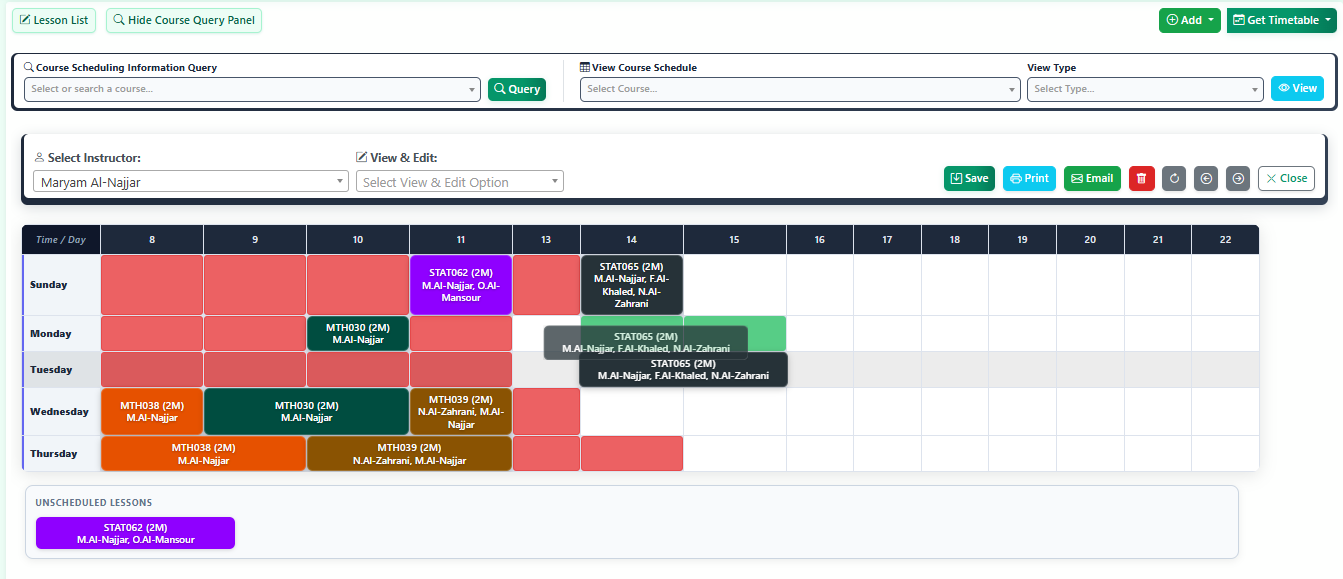
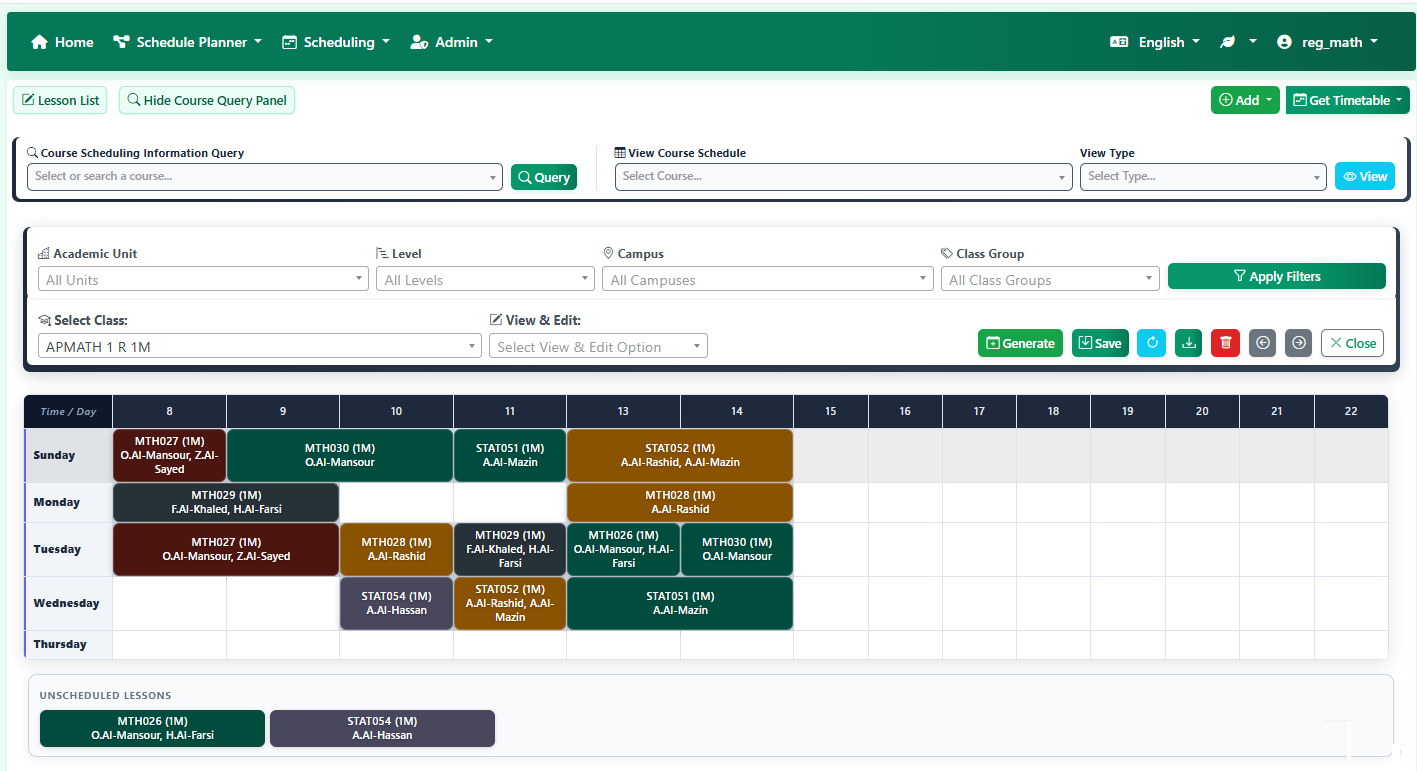
Orchedule Scheduling Interface - Departmental autonomy with seamless coordination and conflict-free resource management
Auto-Generate Schedule

One-click class scheduling

Multi-Table View

Parallel timetable management

Easy Lesson Editing

Full editing capabilities for class loads and lessons

Time Conflict Detection

Instant clash prevention

Unified Control

All-In-One Command Center

Gain full view and complete control over your entire institution's schedules from a single, easy-to-use panel without jumping between contexts.

Complete Data Control

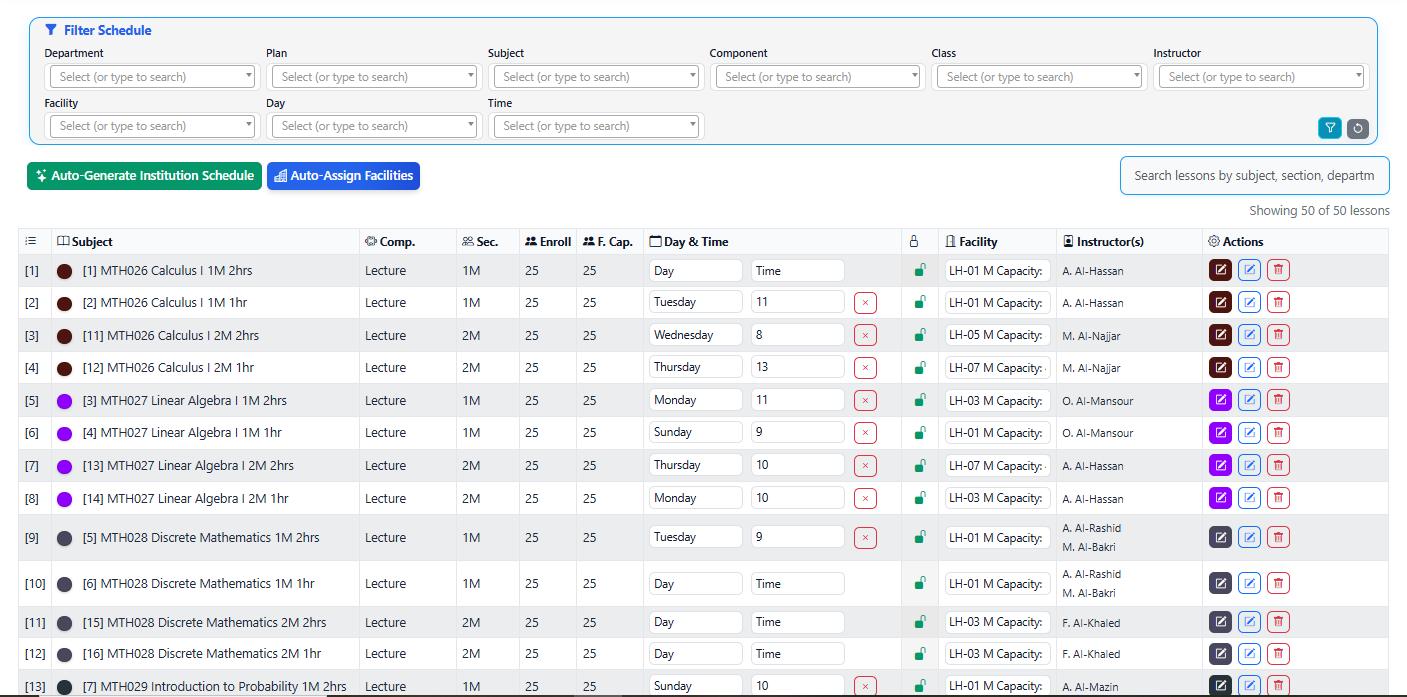
Perform full Create, Read, Update, and Delete operations for Sections, Loads, and Workloads directly from the scheduler. Instantly add new classes or courses to the schedule and view comprehensive course scheduling information in real time.

Deep Filtering

Navigate massive institutional datasets effortlessly with powerful filtering options. Filter schedules to find the schedule of specific group of students or individual student by Academic Unit, Campus, Level, and Class Category.

Export & Automate

Export beautifully formatted PDF schedules for any class, individual student, instructor, or facility. Automatically dispatch finalized schedules directly to students and instructors via email.

Dual-Mode Scheduling Interface

When it’s time to place sections on the timetable, Orchedule provides two powerful interfaces — one for precise slot-and-room selection, one for intuitive visual timetable management.

Visual Drag & Drop
Intuitive Timetable Management
Visual Drag & Drop
Instantly reschedule lessons by dragging them to free slots. The exact same intuitive interface is unified and available for Classes (Groups of Students), Individual Students, Instructors, and Facilities. Conflicts are highlighted in real time, making it easy to build and revise timetables visually across all schedules!
Selective Scheduling
Smart Time & Room Assignment
Selective Scheduling
Choose from only available time slots and free suitable facilities. The system automatically filters out conflicts and capacity issues, ensuring every assignment is valid. Perfect for precise, manual scheduling.
Pricing Plans

Orchestrate Your Success with Transparent Pricing

Simple, transparent flat-rate pricing for Basic Users (faculty & staff), plus optional Institution Registrar top-level access at $400/year. All plans include complete orchestration features and comprehensive onboarding. Additional services available for data import and training.

Ready to Subscribe? Choose your plan and get started today

Enterprise System

For multi-campus systems or consortia

Custom
$400 /Institution Registrar/year
Multi-campus Support
Enterprise SLA
Dedicated Manager

Understanding Our Pricing Model

Basic Users

Faculty and staff who create and manage schedules for their departments.

Flat Rate:
  • $85/user/year
  • Includes full access for schedule builders, department chairs, and regular staff.
Institution Registrar

Central registrar office users with system-wide access across all departments and advanced features.

Fixed Rate:
  • $400/user/year
  • Required for central oversight, final approvals, and global system configuration.

Example: 50 basic users + 5 Institution Registrars = (50 × $85) + (5 × $400) = $6,250/year

Additional Services

All services included free with your subscription to ensure your success

Implementation Setup

Free included
  • System configuration & setup
  • User account creation
  • Permissions & roles setup
  • Basic workflow configuration
2-3 business days

Assisted Data Import

Free included
  • Historical data migration
  • Data validation & cleanup
  • Import from legacy systems
  • Quality assurance testing
5-7 business days

Training & Onboarding

Free included
  • Live training sessions (3 hours)
  • Administrator training
  • End-user workshops
  • Training materials & guides
Up to 20 participants
K-12 Education

Transparent Pricing for Primary & Secondary Schools

School District

Multi-Campus Solution

Custom Contact Sales
Multiple Campuses
150+ Staff Members
District-Wide Reporting
Dedicated Account Manager

Understanding Our Pricing Model for Schools

Program Users

Stream/track coordinators, program heads, and teachers who manage schedules for different academic streams (Science, Arts, Commerce), tracks, or specialized programs in secondary schools. Perfect for schools with multiple programs requiring coordinated timetabling. Simple, flat-rate pricing regardless of school size.

Flat Rate: $40/user/year
School Administrators

Principals, vice-principals, and academic coordinators who manage the entire school schedule, generate reports, handle registrations, and oversee multiple grades/sections with full administrative access.

Fixed Price: $200/administrator/year

Example: 25 program users + 2 administrators = (25 × $40) + (2 × $200) = $1,400/year

Additional Services

All services included free with your subscription to ensure your success

Implementation Setup

Free included
  • System configuration & setup
  • User account creation
  • Permissions & roles setup
  • Basic workflow configuration
2-3 business days

Assisted Data Import

Free included
  • Historical data migration
  • Data validation & cleanup
  • Import from legacy systems
  • Quality assurance testing
5-7 business days

Training & Onboarding

Free included
  • Live training sessions (3 hours)
  • Administrator training
  • End-user workshops
  • Training materials & guides
Up to 20 participants